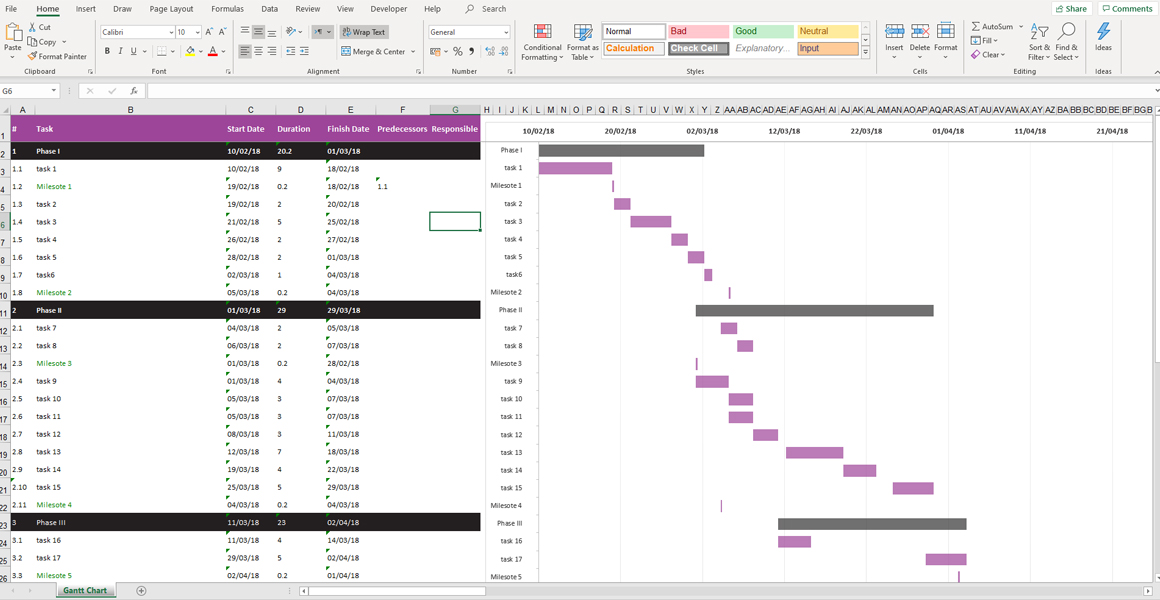
Most project managers managing complex projects rely on Gantt charts to create clear, visual progress timelines. Gantt charts are designed to display tasks, task correlations, work assumptions and resource allocations across a timeline arc, giving project managers critical paths and providing an easy view of tasks, deadlines, and the personnel responsible for each task. Furthermore, Gantt charts help project managers identify potential bottlenecks and adjust schedules when delays occur. As far as improving project planning, coordination and communication – not to mention progress tracking – Gantt charts are highly valuable.
Relying on MS Project – Microsoft’s project management software – to create advanced Gantt charts has become a common practice. But many occasional project managers managing smaller projects do not have access to MS Project, and therefore many feel limited in their ability to work with Gantt charts. Yet in fact, there are many other tools that support basic Gantt chart creation – including Microsoft Excel. These tools may not be sufficient for complex projects, but are more than reasonable for smaller-scale undertakings.
As project managers, you can build Gantt charts in Microsoft Excel using the software’s basic features (tables, data columns, calculations, cell references) However, using Microsoft Excel templates is even better. Templates dedicated to creating effective Gantt charts help save set-up times and reduce errors. They provide a polished, ready-to-use structure with pre-built formulas and formatting.
At PMZONE, we developed our very own Gantt chart template for Microsoft Excel. Our template is sophisticated and yet also simple-to-use, and we consider it to be a “best-of-breed” solution.
Without Gantt charts, project managers feel like they’re driving a car with no dashboard control panel. You can still drive, but you don’t know how fast you’re going, or how much fuel you have. Using Microsoft Excel to create Gantt charts is a great way to move forward. Using our proven Excel template saves you time, reduces your margin of error, and elevates your project management capabilities.